I run my whole EcoFlow setup on Home Assistant — a Smart Home Panel 3, plus a DELTA Pro Ultra and a DELTA Pro Ultra X, each with a two-battery stack (~24 kWh total) — entirely over local Bluetooth, with the EcoFlow cloud turned off. It handles my Dominion Rate 7 time-of-use scheduling automatically, and it does a few things the app can't.
Fair warning up front: this is an advanced, do-it-yourself setup. You don't need any of it to get value from an EcoFlow — the app and a Smart Home Panel do the core job. But if you're the type who likes local control and exact automation, here's how mine works.
The setup: local, no cloud
Integration:
ha-ef-ble(rabits/ha-ef-ble, installed through HACS) — an unofficial, 100% local Bluetooth integration. No cloud, no MQTT, no Modbus. I keep EcoFlow's cloud integration switched off entirely; everything runs over BLE. (Credit to the maintainers — this is their work; I test and file issues.)What it reads and controls: the Smart Home Panel 3 (operating mode, charge limits, per-channel force-charge, EPS) and the DELTA Pro Ultra / Ultra X units.
Where Home Assistant runs: Home Assistant OS as a VM on ESXi, on a Dell PowerEdge T130 in my rack.
The Bluetooth proxies (don't skip this): none of the EcoFlow gear sits next to my server — the Smart Home Panel is in the laundry room, and the smart inlet box, inverters, and batteries are in the garage, all out of clean BLE range of the rack. To bridge that I run three ESP32 proxies flashed with ESPHome's
bluetooth_proxy, one per EcoFlow device, each placed near the device it serves: an ESP32-S3 board with PoE Ethernet, an Apollo Automation TEMP-1, and an Everything Presence One. That "one device per proxy" part isn't fussiness — it's the maintainer's own recommendation, and I learned the hard way why.All three currently run over Wi-Fi; the Ethernet port on the S3 board is sitting unused. That detail matters more than it sounds, because an ESP32 shares a single 2.4 GHz radio between Wi-Fi and Bluetooth, and how you configure scanning decides whether there's any airtime left to hold a connection. Which brings me to the thing that cost me a week.
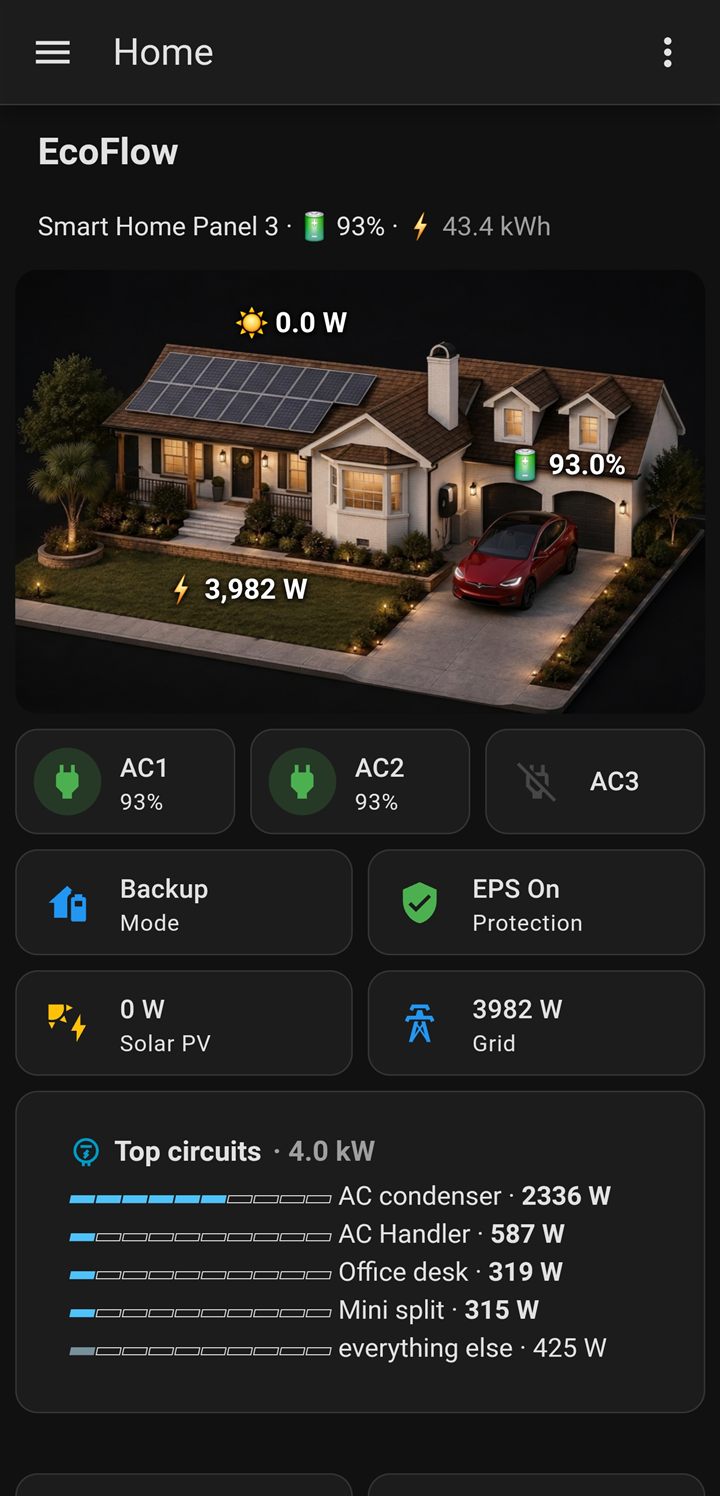
That dashboard is a big part of the appeal. I built the whole thing in Home Assistant — the home graphic, the per-circuit bars, the live power flows — to mirror EcoFlow's own PowerInsight, the $399–$499 touchscreen display they sell for exactly this kind of monitoring. Mine cost nothing beyond hardware I already had, it runs locally (the PowerInsight leans on EcoFlow's cloud), and it's entirely mine to change — any sensor, any layout, and it can pull in anything else in the house. If you're the tinkering type, you can take it well past what the off-the-shelf display does.
The week I lost to a connection bug
In mid-August my DELTA Pro Ultra X started refusing to connect after any Home Assistant restart. The integration would report "Device connected but did not get to auth procedure" and retry forever. The only thing that reliably cleared it was walking to the garage, unplugging the battery, and powering it back up — not a solution when restarting Home Assistant is a routine thing.
I spent days on the wrong layer. I suspected signal strength, then proxy caching, then connection slots, then the integration version — I rolled back through three of them. Along the way I found a real ESPHome change worth knowing about: as of 2026.8.0, when Wi-Fi is configured the BLE scan window takes the interval value, so the proxy scans continuously. Wi-Fi and Bluetooth share one radio on an ESP32, so that leaves very little airtime for holding connections. Pinning it back with esp32_ble_tracker scan parameters is worth doing on any Wi-Fi proxy:
esp32_ble_tracker:
  scan_parameters:
    interval: 320ms
    window: 30ms
I left that in place and it does no harm — but it wasn't what was breaking my system. The actual cause was two bugs in the integration itself.
Devices were outbidding each other for a proxy. Home Assistant scores each proxy by signal but penalizes it for every connection already in flight, so in the reconnect scramble after a restart, a proxy five feet from the battery could lose to one across the house.
And whichever device connected last would fail its authentication handshake and never recover. I proved it by hand: disable the other two EcoFlow devices in Home Assistant, and the DELTA Pro Ultra X connects on the first attempt — then holds perfectly while the other two are re-enabled. Not a signal problem, not a hardware problem. A startup race.
Both are fixed in ha-ef-ble v1.1.1 (September 4), which stops the proxy outbidding, adds a per-device preferred proxy setting, and fixes the auth race. I pinned each of my three devices to the proxy nearest it, and restarts have been clean since.
One diagnostic worth stealing if you ever chase something similar: while the battery was stuck, I connected to it from my phone with nRF Connect and read its Bluetooth service table directly. Everything the integration needed was right there — the vendor service, the write characteristic, the notify characteristic — at the exact moment Home Assistant's logs claimed it could only see generic housekeeping services. That one check ruled out the battery and pointed at the software layer, which is where the fix landed. It also stopped me blaming EcoFlow for something that wasn't their bug.
The habit I took away from it: before theorizing about anything in a community integration, read that project's GitHub issues sorted newest first. Every answer I eventually found was already sitting in a thread filed days earlier — usually by someone who'd hit it before me.
One smaller gotcha from the same stretch: per-battery temperatures don't appear until you ask for them. My DELTA Pro Ultra reports each pack's cell temperature, but those sensors only get created when the integration enumerates the packs at setup. If your stack was added later, run Reconfigure on the device and they show up. Without that you'll find only inverter and system temperatures, which read 20–30°F hotter and are not battery temperatures, however tempting it is to treat them that way.
What I automate: Rate 7, to the minute
The flagship is a time-of-use scheduler tied to Dominion Rate 7, fully automated:
- Charge during super-off-peak overnight, with a force-charge top-up to fill the batteries before the cheap window closes.
- Flip to Self-Powered — run the house off the batteries — through the summer on-peak window (4–8 pm), when grid power is most expensive.
- Return to Backup mode afterward with a ~50% overnight reserve, so there's always a cushion if the grid drops.
It's all local and minute-precise — it hits the exact rate-boundary times, not a rough schedule. When Dominion shifted the Rate 7 windows in July 2026, I updated the automation and it adapted; the app's built-in scheduler wouldn't have.
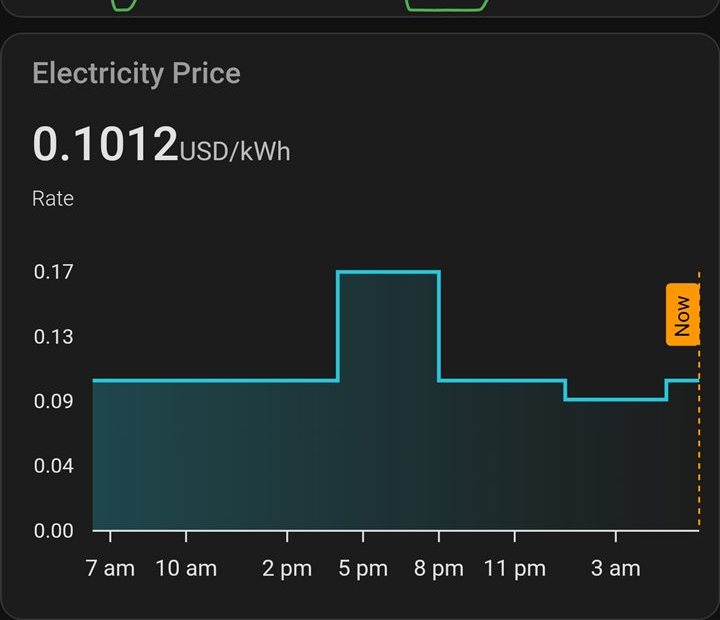
Underneath it is a reliability layer (more on why in a second), plus an EPS "drift guard" that keeps backup power armed outside the discharge window, and a startup sync that puts the panel back in the right mode after a Home Assistant reboot.
That's the summer shape. Winter runs two cycles a day instead of one, because Rate 7 opens a second super-off-peak window at midday and moves the expensive hours to the morning. Building that schedule also turned up a mode behavior that was quietly throttling my solar — panels dropping from 1,119 W to under 100 W in the same minute, same sun, purely from being in the wrong mode. (The winter schedule, and the measurement behind it.)
Why this beats the app
- It works with no internet. This is a backup system — leaning on the cloud is a weakness exactly when you need it, because an outage often takes your internet with it. Local Bluetooth keeps running.
- Minute-precise scheduling. The app's scheduling is coarse; Home Assistant hits exact rate boundaries and adapts when the utility changes the windows.
- Long-term history and dashboards. Graphs of charge and discharge, per-circuit load, and state-of-charge over time — not just a live gauge.
- Whole-home context. Home Assistant can tie the battery's behavior to everything else in the house. The app is an island.
Two firmware quirks — and how I work around them
Every product has rough edges. These are two I hit, each with the fix I built — and the point isn't to knock EcoFlow (I run their hardware daily and recommend it). It's that local control lets you paper over the rough edges yourself.
- AC input channels dropping on their own. The Smart Home Panel would occasionally disable an individual AC input channel by itself — with AC power still present, so not a grid event. I confirmed it from the panel's own two-second telemetry: about two events every ten days, no correlation with load. My fix is a Home Assistant automation that catches the drop and re-enables the channel in about 15 seconds — it's still needed, so the automation runs to this day.
- Commands that silently don't apply. While building the scheduler I found the panel would accept a command over Bluetooth, report no error, and then not actually do it — invisible to normal connection monitoring. So every automation now writes, waits for the panel to echo the new state back, and retries up to three times before it alerts me. Nothing gets assumed.
(I confirmed the channel-drop quirk by decoding the panel's own telemetry stream — which is well past what most people should attempt, so I'm not walking through that part here.)
The bottom line
You don't need Home Assistant to get value out of an EcoFlow — the app plus a Smart Home Panel covers the essentials. But if you want local control, exact time-of-use scheduling, and a reliability layer that checks its own work, this is what the hardware can do once you take it off the cloud. It's also a big reason I favor systems you can run locally in the first place: they're insulated from cloud outages, internet-down moments, and long-term vendor risk.
If you don't own the hardware yet, everything here assumes a decision you haven't made — which EcoFlow system to buy, and what it costs once it's installed covers that part, including the panel choice that swings the price by thousands.
If you're weighing a battery for your own home, run your Dominion bill through the analyzer — it shows what one would actually do for your bill at today's rates. The automation is a bonus on top of that.
I may earn a commission from links on this page, at no extra cost to you — it never changes the numbers or the recommendation. The ha-ef-ble integration is a community project; I'm not affiliated with its maintainers. This describes my own setup and isn't installation advice — changing how a battery system operates is at your own risk.