If you've decided on an EcoFlow Smart Home Panel 3 (SHP3), EcoFlow gives you a thorough official installation guide (PDF) — cable entry, mounting, subpanel wiring, communication, the smart inlet box, commissioning, breaker compatibility. It's the reference your electrician should follow, and I'm not going to reproduce it here.
What that manual doesn't cover is the homeowner side — the decisions and surprises that land on you, not on the installer holding the wire strippers. This is that layer: what to plan for, what drives your cost, who should actually do the work, and the steps that quietly trip people up. Think of it as the guide to read before the install, so you and your electrician walk in aligned.
Start with planning — it decides your cost
The biggest variables in a Smart Home Panel install aren't the panel itself — they're how it's wired into your home and where everything physically sits. Both drive your cost far more than the hardware.
What gives you freedom in the layout is the smart inlet box. It's installed wherever your batteries and inverters live — that's the unit they physically plug into — and it ties back to the SHP3 through a heavy, dedicated cable. Because of that run, the batteries and inverters don't have to sit next to the panel at all. In my own install, the panel is in the laundry room while the smart inlet box, inverters, and batteries are in the garage, connected back by that cable.
That run between the SHP3 and the smart inlet box is heavy-gauge cable, and its path is a direct cost driver: the longer or more awkward it is, the more wire and labor the job takes. Its gauge isn't a guess — EcoFlow's guide specifies the conductor, and a competent electrician sizes to that spec based on your main-vs-subpanel choice. Confirming they've read it is one of the things to check.
Before anyone quotes you, work through:
- Main panel replacement or subpanel. The SHP3 can be wired two ways: it can take over as your home's main load center (a main-panel replacement), or sit downstream of your existing main as a subpanel that backs up a chosen set of circuits. Mine replaced my main outright. Which one fits comes down to how much of the house you want covered and what your electrician confirms works with your service — and it drives the scope, wiring, and price of everything that follows. Settle this first; the rest of the plan hangs off it.
- Whether your service can support it. Before anything physical, your electrician should confirm your electrical service — its size and existing load — can carry the install as planned. If it can't, a service upgrade enters the picture; far better to learn that at the quote stage than mid-job.
- Where the panel mounts, and — separately — where the batteries go. These are two independent placement problems. The panel needs an accessible spot with the working clearance code requires. The battery and inverter stacks are their own question — tall, heavy, floor-standing units that need their own space with room to service them. The two don't have to sit together at all (mine don't), so plan each on its own terms.
- A stable connection where the panel mounts. The SHP3 needs internet to commission, and to stay connected for monitoring and firmware updates afterward. If it's going in a garage or utility room at the edge of your Wi-Fi, plan coverage for that spot — a mesh node or a wired drop — so you're not fighting a weak signal later.
- Which circuits you back up. You don't need to back up the whole house — you decide which loads matter (fridge, well pump, a mini-split, medical equipment, some lights and outlets) versus what you'll let ride the grid, up to the panel's circuit count.
- The SHP3-to-inlet-box run — length and conductor material. Beyond the gauge (which the guide sets), two things move the price. Distance is one: runs up through an attic, across a crawlspace, or around a finished wall all add labor and wire. Material is the other, and it's the big one — copper costs far more than aluminum for the same run. Ask your electrician to spell out both the length and the material in the quote; together they can swing the number substantially.
You choose the system — what to back up and how much battery — from your actual needs and bill. Your electrician prices and executes the electrical work. Getting the layout settled first is what keeps that quote from ballooning mid-job.
Permitting and inspection: your electrician's job
Almost everywhere in the US, an SHP3 install is permitted work that gets inspected by your local authority having jurisdiction (AHJ). Done right, the inspection is a formality — the checkpoint that confirms the system is safe and to code. Done carelessly, it's where the job stalls: a missed feeder spec, no service disconnect, grounding that isn't to code, or paperwork that never got filed all mean a failed inspection — rework, a re-inspection fee, and days or weeks added to your timeline. The difference comes down to planning and the competence of whoever does the work.
That's why this part matters: the electrician handles permitting and inspection, and is accountable for passing it. A qualified installer pulls the permit, validates what your specific home needs to meet code before the work starts, schedules the inspection, and stands behind the result. You shouldn't be the one chasing the permit office — and if an installer wants you to pull an owner permit for service-entrance work you're not doing yourself, treat that as a flag.
With a vetted installer, that submission-and-inspection responsibility sits with them — and it should be spelled out in your agreement.
One thing worth knowing about before the inspector shows up: the listing label, which lives inside the panel door.
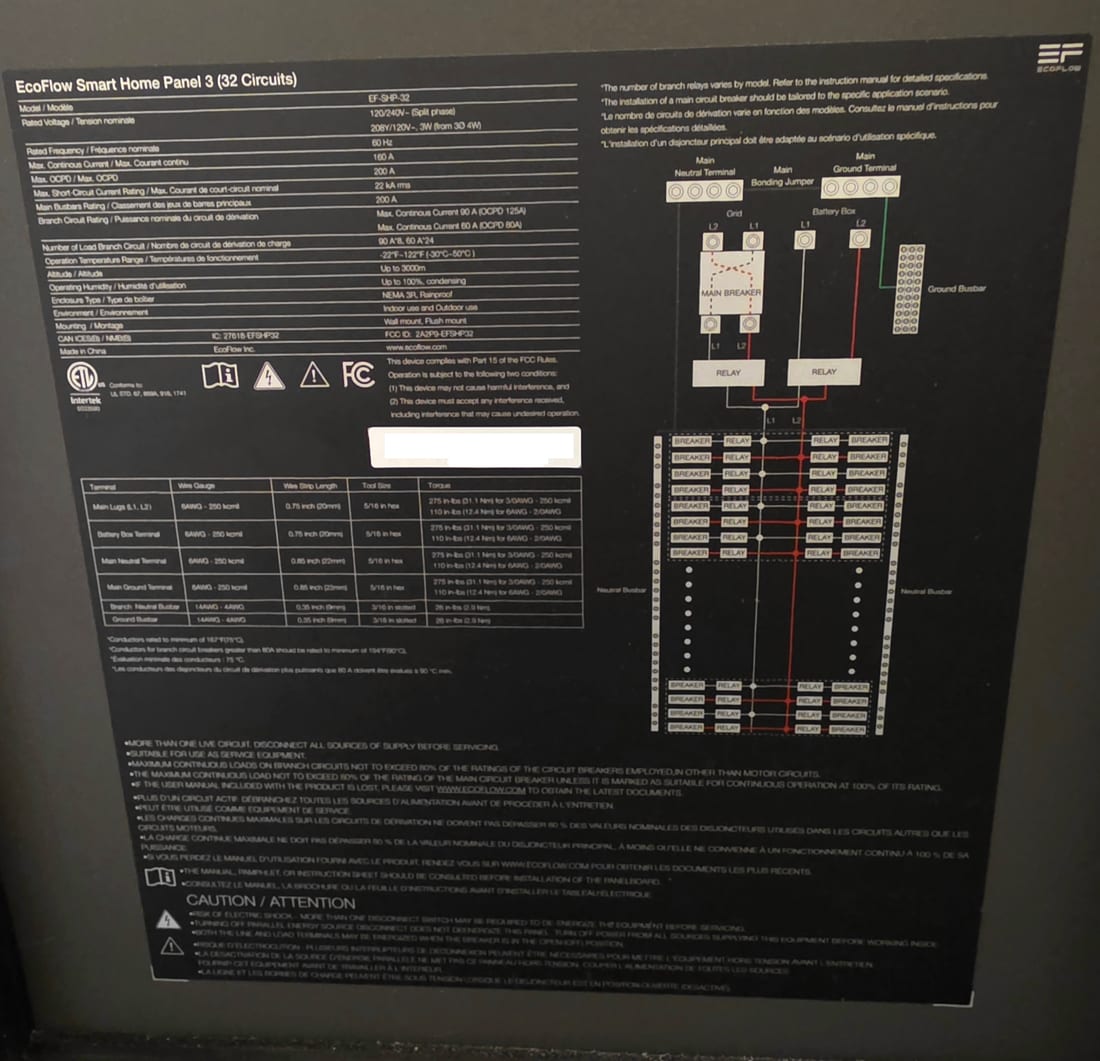
Mine was among the first SHP3 units the inspectors here had seen, and sign-off stalled over whether it was approved equipment — which left me without power for a day. The label settles it, and it is worth knowing what it actually says. The mark is ETL, from Intertek, not UL; people look for a UL stamp, don't find one, and jump to the wrong conclusion. ETL is a Nationally Recognized Testing Laboratory exactly as UL is, and the label names the UL standards the panel was tested to — 67 (panelboards), 869A (service equipment), 916 (energy management) and 1741 (distributed energy resources).
The line that decides whether it can replace your main panel rather than hang off one is near the bottom: "Suitable for use as service equipment."
The older-home upgrades that drive your quote
If your house is newer, the SHP3 may drop in cleanly. If it's older, code-required upgrades are where quotes climb — and where a surprise line item shows up if nobody warned you. The common ones:
- A four-wire feeder. Older three-wire setups often need to be brought up to a modern four-wire (separated neutral and ground) arrangement to integrate the panel correctly.
- A service disconnect. Many installs require a proper exterior disconnect if one isn't already present.
- Supplemental grounding. Additional grounding electrodes or bonding to satisfy current code.
None of these are exotic — a good electrician handles them routinely. But they add cost, and they depend on your home's existing wiring, not on EcoFlow's price list. Ask your installer to call these out in the quote so nothing lands as a mid-job "well, actually." This is exactly the kind of thing a good installer spells out before you commit — and one of the things we look for when we vet one.
Who installs it — and why to skip EcoFlow's own installer route
This is the part I'd flag hardest.
EcoFlow sells a "turnkey" installation service that routes you to an installer from their third-party network. It's marketed as cheaper and simpler. EcoFlow's own community forum tells the other side of it — and it's worth reading before you sign up for it.
Recurring reports from r/Ecoflow_community and EcoFlow owners:
- Assigned installers who ghost. Homeowners describe an electrician who took a permit fee (sometimes $500+), then failed to file the paperwork and stopped responding — one thread is titled outright "Warning: do not use the ecoflow-certified install…"
- Costs stacked on top of the "turnkey" fee. The installation charge you pay EcoFlow isn't always the whole bill — owners report the assigned installer then billing them separately for permit fees, materials, or code upgrades. The flat, "cheaper than a licensed electrician" pitch can quietly stop being all-in once the work is underway.
- Botched physical work. Panels mounted tilted or on a single stud without proper clearance; battery and inverter units wedged into spaces too tight to access or service; installers who wired the hardware and then left before configuring the software.
- Dangerous electrical errors. Overpacking circuits into the panel until the unit failed; grid line-in and battery phase mismatches that trip the main breakers and black out the house during an outage test — the exact moment the system is supposed to save you.
- Support that contradicts the product. Remote helpdesk instructions that don't match physical hardware limits, sometimes turning a small problem into a weeks-long return — one owner's "bad installation support" thread is a representative read.
- Loss of control. With the account set up under the assigned installer rather than the owner, people have reported a fired installer who still held remote access to their system after the relationship ended.
The through-line isn't the hardware — the DELTA Pro Ultra and SHP3 are solid. It's being handed an installer you didn't choose, can't sit across from, and can't hold accountable, on a timeline EcoFlow itself calls "unpredictable."
The advice EcoFlow's own owners keep landing on: buy the hardware, then hire a reputable, highly rated local electrician — one you've vetted, who has done complex whole-home battery projects before, and who you hand the installation manual to up front.
That is exactly the gap NRG Sense is built to close. Vetting an installer well is genuinely hard to do as a one-time homeowner — you don't know what to ask, what "good" looks like on these specific systems, or who's actually done one before. That's the part we take on. Before we'll put our name behind an installer, they have to clear a high bar:
- Local and licensed — a pro in your area you can meet and actually reach, not a name handed down from a distant network.
- Fluent in the procedures — we go over the SHP3 install, the smart inlet box, the feeder and code work with them, so we know they understand this system, not just wiring in general.
- Proven on these projects — we confirm they've done whole-home battery and Smart Home Panel installs before, to code and inspection.
- Someone we'd trust with our own home — the only installers we'll recommend, so the accountability for your permit, your inspection, and your schedule stays with a pro who's earned it.
You still decide what system fits your home and your bill. Our job is to make sure the person putting it in is one worth handing the work to — and to keep this whole guide's worth of gotchas from becoming your problem to catch.
Questions to ask before you hire
Whether you go through us or find someone on your own, take this list to any electrician before you sign. Their answers tell you quickly whether they've done this before:
- Have you installed an EcoFlow Smart Home Panel — or a comparable whole-home battery system — before? Ask to hear about a specific one.
- Should mine be a main-panel replacement or a subpanel, and why? You want reasoning tied to your service, not a shrug.
- Will the SHP3-to-inlet-box conductor be sized to EcoFlow's spec, and run in copper or aluminum? The gauge is in the guide; the material is their call, and copper vs. aluminum is a meaningful price difference they should be able to explain.
- What code upgrades will my home need — four-wire feeder, service disconnect, added grounding — and are they in the quote?
- Who pulls the permit and schedules the inspection? The answer should be "we do."
- What's the full timeline, including the wait for inspection sign-off before the system can be energized?
- How will you commission it if the house is powered down for inspection — do you bring your own connectivity?
- Will you commission the system under my EcoFlow account? The answer should be yes — you own the account, they just use it to set things up.
An installer who answers these cleanly is worth talking to. One who dodges them is telling you something.
The commissioning step that catches people off guard
Once the panel is wired, it gets commissioned through the EcoFlow app — that's where operating modes, backup behavior, and per-circuit settings get configured. Commissioning needs an internet connection.
What commissioning actually involves, in order:
- Update firmware first. Before pairing anything into a working system, get every unit on current firmware — the DELTA Pro Ultra / Ultra X inverters, the battery modules, and the SHP3. Outdated firmware is one of the most common causes of units that won't pair, don't show up, or misbehave — and updates need internet, so do this while you have a solid connection, not mid-hotspot-scramble.
- Add the units in the app. Pair the DELTA Pro Ultra / Ultra X and their battery stacks first, then add the Smart Home Panel 3 — the panel wants to see the power units.
- Configure the panel. Map each circuit to how you want it treated, set your operating mode and backup reserve, and set up the backup (EPS) behavior.
- Test with a live outage. Simulate an outage and confirm the right circuits carry over cleanly, with no breaker trips. This is exactly where the phase-mismatch failures surface — far better to catch it now, with the installer standing there, than the first time a storm hits.
Here's where it gets awkward, and it has nothing to do with a storm: right after a fresh install, the system usually can't be energized until the inspection signs off. That leaves a window where the newly installed panel — and possibly your whole house — is powered down, and if your router is one of the things that's dark, the app has no way to reach the panel.
How much this bites depends on your configuration:
- Main-panel replacement: the whole house is de-energized through that window, so your internet is down with it. Plan on a phone hotspot so the installer can connect to the SHP3 and commission it.
- Subpanel: usually easier — the rest of the house keeps running off your existing main, internet included. It only becomes a problem if your modem and router happen to sit on a circuit that got moved into the SHP3, and is therefore dark until it's commissioned.
Either way, the fix is two minutes if you see it coming: have someone ready to hotspot a phone. Ask your installer up front how they plan to get the panel online for commissioning, so it doesn't turn into a "come back another day."
Before the installer leaves
The handoff matters as much as the install. Don't let them pack up until:
- It passed a live outage test — not a described one. Cut the main (or have them simulate it) and watch your backed-up circuits stay live with no trips.
- It's on your own EcoFlow account. Set the account up in your name beforehand; your electrician commissions using it, so control stays yours. Log in yourself before they drive off and confirm you can see and control every device.
- Circuits are labeled — in the panel and in the app — so you know what's backed up and what rides the grid.
- You have the paperwork — the passed-inspection sign-off, model and serial records, and the warranty registered in your name.
Living with it
Once it's commissioned, the SHP3 does its job through the EcoFlow app — modes, monitoring, backup. If you're the type who wants to push further, it can be run locally and automated well past what the app does; here's how I run mine on Home Assistant, no cloud required. That's optional. The core system stands on its own.
One habit worth building for outages: stage your big loads. You're running on a finite battery and a fixed inverter ceiling, so the AC, an EV charger, an electric dryer, and a well pump all firing at once can trip the inverter or drain the pack fast. Decide ahead of time which heavy loads you'll pause when you're on battery — plenty of people leave the EV charger and dryer off the backup set entirely for exactly this reason.
The short version: an SHP3 install goes well when the planning happens first, the older-home upgrades are quoted up front, a vetted local electrician owns the permit and the work, someone's ready to hotspot at commissioning, and you finish holding the account and the paperwork. Get those right and it's a clean, boring install — which is exactly what you want from the thing that keeps your lights on.
If you haven't picked a system yet, start one step earlier: which EcoFlow to buy and what it costs installed covers the choice between the two systems and whether you need the SHP3 at all — there's a cheaper manual route worth knowing about before you commit to this one.
And if you haven't sized anything yet, run your power bill through the analyzer — any utility, anywhere. It shows what a battery would actually do for your home before you talk to anyone about installing one.
I may earn a commission from links on this page, at no extra cost to you — it never changes the numbers or the recommendation. This is planning information, not electrical or code advice; the specifics for your home are for your licensed electrician and local authority to determine. Community reports referenced here are from EcoFlow's user forums and reflect individual experiences.